Embeddings: The data that AI understands
1. Introduction
You've probably heard about "embeddings" like a buzz word everywhere. Especially with how AI has become a part in everyday life, and how everyone is talking about "AI Agents", "RAGs", "Fine Tuning", etc. Even if you're a bit technical, you probably and most likely know what it already is, but do you really understand how its being actually used and utilized? Don't worry, let's first understand what an embedding really is, and how it's being used as data for AI.
What really is an Embedding?
Before we answer that question, have you ever thought about how AI really understand data? Matter of fact, do you know how data are being represented in a computer? Raising those question will help us understand embeddings from First Principles and lay a strong foundation in our understanding and breakdown.
Without going into too deep, a computer basically understands data in the representation of Binaries i.e. 0s and 1s. Every Image, Video, Documents, etc. are being represented in 0s and 1s.
And what about Data? Specifically how it's being used in AI.
How do AI understand data?
You've seen AI generating Texts, Images, Videos, and a whole lot more. But how does AI really understand data?
If you've heard or learn about deep learning like the CNN Architecture or Natural Language Processing you'll see that every bit of data is being converted into a Vector representation of the data. A Vector Representation is essentially a Multi Dimensional Matrix with a set of numbers.
Think of a 3x2 Matrix where the matrix
and this can represnt any form of data, like the word "cat" is , in it's vector representation of it. Essentially
This is just an example, but in large scale AI training, we would be using lot's of Multi-Dimensional Matrix and values mostly ranging from -1 to 1 (in float data, having like 10 decimal points)
Similarly every bit of data whether it be Images, Videos, Texts, Audios, etc. are being converted into this type of Vector representation of it's correspondent data to be used in training AI and processing data for AI.
So, what's the embedding?
If you've understood what a Vector data is then that essentially means that is the embedding we were talking about. A single word can have a different vector, a combination of words have another totally different one, even a slightly change in pixel of the same exact image can have a different vector. That's how vecotrs are used as embeddings.
Does that sound easy? We're getting to the good part next.
2. Understanding or "seeing" the embeddings
We've now understood what an embedding really is. But now comes the part of how AI really understand it or does it really sees the embeddings as data. For that we're going to use a few visualization to understand it better.
Visualizing the Embeddings
Before we get into visualizting a Vector, I want you to understand this,
"A vector isn't just a list of numbers. It's a position, "
The numbers are coordinates telling you exactly where to put a dot, and where it is.
Let's take a plot
Look at the plot below.
Which means that move 1 point along the X axis, and 2 points up along the Y axis and put a dot there. This is the position of the word "Cat" That dot is the cat.
Walk 4 right, 5 up, That dot is the position of the dog.
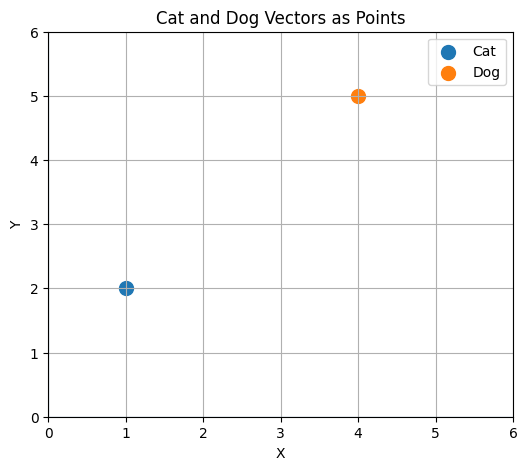
Two dots. Not very exciting yet. But notice they're apart. Cat sits down in the lower-left, dog up in the upper-right. That gap is real. It's the embedding saying "these are different things." The distance between the points already carries meaning.
Now, two points is boring. What happens when we embed lots of things?
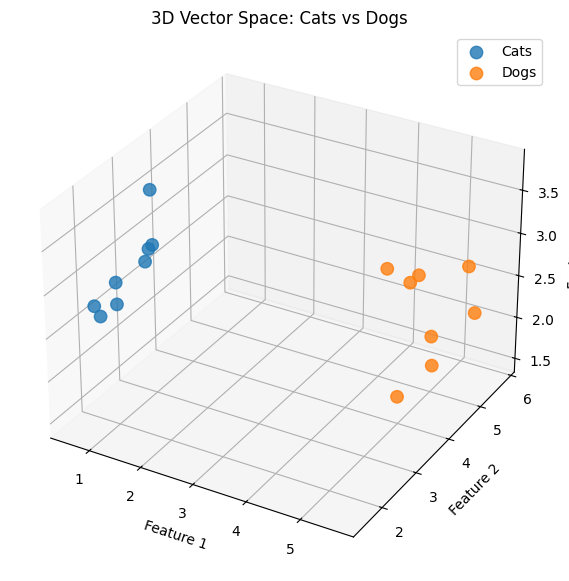
Look at that. The cat points huddle together in one corner. The dog points huddle in another. They cluster. And nobody told them to. Nobody wrote a rule saying "cats go here, dogs go there." The embeddings were learned such that things which are similar end up near each other, and things which are different end up far apart.
That's the whole idea in one picture: proximity = similarity. Position in the space encodes meaning.
(One honest note: real embeddings live in 768 or 1532 dimensions, not 2 or 3. We can't see those. So in practice people use tools like t-SNE or UMAP to squash high-dimensional vectors down into 2D or 3D so we can look at them. It's lossy, you lose detail, but the clusters survive. These little toy plots are the same idea, just small enough to see directly.)
3. The Action or "Calculation"
Okay. Vectors have positions, and positions encode meaning. But how do we actually use that? What's the "action"?
It's this: given a new thing, find the closest existing things. Compare, measure distance, retrieve the nearest. That's it. And the most common place you'll meet this is semantic search.
Semantic Search, By Hand
Let's do a tiny example, reusing the same 2D space from the first plot. Say our little database has three items embedded:
- cat = [1, 2]
- dog = [4, 5]
- car = [5, 1]
Now a user types a query: "kitten." We embed "kitten" and it lands at [1.5, 2.5]. Notice: the word "kitten" appears nowhere in our database. There's no keyword match anywhere. So how do we find what they're looking for?
We measure distance. The simplest way is Euclidean distance — the straight-line gap between two points, i.e. the Pythagorean theorem you already know.
Distance from kitten to cat:
Distance from kitten to dog:
Distance from kitten to car:
Kitten sits 0.71 away from cat, but 3.54 from dog and 3.81 from car. Closest match: cat. Semantic search returns "cat."
And look at what just happened. "Kitten" is a completely different word from "cat." A keyword search would've returned nothing, because the strings don't overlap. But because both words landed in the same neighborhood of vector space, the distance-based search found the right thing anyway. Meaning, not spelling. That's semantic search.
(In real systems people often use cosine similarity instead of raw Euclidean distance. Cosine similarity measures the angle between two vectors rather than the straight-line gap, which makes it more robust when vectors have different lengths. It's the dot product divided by the product of the magnitudes:
giving a score from -1 to 1. Same goal, though: figure out which stored vector is "closest" to the query.)
4. Where Do Embeddings Actually Come From?
One thing I want to clear up, because it tripped me up early on: nobody writes these numbers by hand. Nobody sat down and decided "the third dimension of 'cat' should be 0.87." And nobody placed those clusters in the 3D plot by hand either.
Embeddings are learned.
Roughly, here's how it goes. You start with a model and initialize its embedding layer with random numbers. Pure noise. Meaningless coordinates. Cat, dog, car scattered wherever the random number generator dropped them. Then you train the model on a huge amount of data, millions of sentences, billions of words and give it a job. Maybe predict the next word. Maybe predict whether two sentences mean the same thing. Maybe match an image to its caption. The exact job depends on the model.
Every time the model gets the job wrong, backpropagation runs. Gradients flow backward through the network, and the embedding vectors get nudged. Tiny adjustments. A little to the left, a little up. Multiply by a learning rate, subtract the gradient, repeat. Billions of times.
And here's the part that produces those clusters: words that keep showing up in similar contexts keep getting nudged in similar directions. "Cat," "dog," and "kitten" all appear in sentences about pets, animals, fur, feeding. So their vectors drift together. "Car" shows up in totally different sentences — roads, engines, driving, so it drifts elsewhere. Over millions of steps the geometry crystallizes, and you end up with exactly the picture from before: similar things clustered, different things apart.
Different models give you different embeddings. The vector for "cat" in Word2Vec is not the vector for "cat" in BERT. Different training jobs, different architectures, different spaces. But the principle never changes: learn the coordinates such that the geometry encodes meaning.
5. Same Idea, Different Data
Everything we've done so far has been text-flavored. Words, sentences, queries. But here's the thing that made embeddings feel big to me: the principle was never about text. The principle is turn whatever you have into a vector, and let the geometry carry the meaning. Text was just the first place people got it working.
When you switch the kind of data, two things change: the encoder (the model that chews raw data into a vector), and what "similar" means in that space. Everything else stays exactly the same.
Text: Meaning From Context
We've covered this one, but there's a detail worth adding. Modern text embeddings are contextual. The vector for "bank" in "we sat by the river bank" is not the vector for "bank" in "I opened a bank account." The embedding depends on the whole sentence around the word, not just the word itself. That's also why sentence embeddings exist: you embed the entire sentence as one single vector, and that's what semantic search actually compares. Not words. Whole thoughts.
Images: From Pixels to Patches to Points
A raw image is just a grid of pixel values. Say a 224 × 224 × 3 block of numbers. That's not an embedding. That's just data. To get an embedding, you push it through a vision encoder, like a CNN or a Vision Transformer (ViT).
The ViT approach is fun. You chop the image into small patches 16 × 16 pixels each and treat every patch like a "token," exactly like words in a sentence. Then transformer attention runs over the patches, and out the other end comes one single vector for the whole image.
Now "similar" means visually or semantically similar. Two photos of two different cats land near each other. A photo of a cat and a sketch of a cat can land near each other. And remember what we said way back in the intro: nudge a few pixels and the vector shifts a little. Swap the content cat becomes dog and it jumps to a completely different neighborhood.
Video: Images, Plus Time
A video is just a stack of images with time threaded through them. So a video embedding has to capture not only what's in the frame but what happens. A simple approach embeds each frame and averages them together. The stronger approach uses video transformers that attend across space and time at once, so motion itself gets encoded.
The payoff: "similar" now means "the same kind of event." A clip of someone scoring a goal in a packed stadium and a clip of someone scoring a goal in an empty park can be neighbors in vector space — even though not a single pixel matches. Content search becomes action search.
Audio: Sound Has a Shape
Raw audio is a long squiggly line of amplitudes, tens of thousands of numbers per second. Not very embeddable as-is. So the first move is to turn it into a spectrogram: a picture of the sound, with frequency on one axis, time on the other, and intensity as color. Suddenly audio is an image, and image techniques apply. Models like wav2vec and Whisper go further and learn embeddings straight from the sound itself.
"Similar" here can mean a lot of useful things. The same word said by two different people. The same person saying two different words. Two songs with the same mood or energy. This is exactly what powers things like Spotify's recommendations every track is a vector, and "more like this" is just nearest neighbors.
Geospatial: Places as Vectors
This one surprised me the most. You can embed locations.
There are two flavors. The first: embed satellite imagery. Chop the map into tiles and embed each tile like any other image. Now the vector describes what a place is like dense urban, farmland, forest, coastline. "Find me every area that looks like this one" becomes a nearest-neighbor search. That's genuinely useful for mapping, agriculture, disaster response.
The second flavor is weirder and cooler: embed the places themselves, not their pictures. A neighborhood isn't just its latitude and longitude. It's foot traffic, venues, transit, noise, rhythm of life. Models trained on check-ins and movement data produce vectors where two neighborhoods on opposite sides of a city end up neighbors in embedding space, because they function the same way. Raw coordinates alone would never give you that and hey, that's our opening lesson again: numbers only mean what the space says they mean.
There's even work like GeoCLIP that aligns images and GPS coordinates into one shared space, so a single photo can be mapped to roughly where on Earth it was taken.
One Space For Everything
Here's the punchline. If every modality becomes a vector, nothing stops you from training them into the same space. CLIP did exactly this with images and text: train on millions of (image, caption) pairs until matching pairs sit close together. After that, "find me images of a dog riding a skateboard" is just: embed the sentence, run nearest neighbors over the image vectors. No keywords. No manual tags. Text querying images, as pure distance.
Which means the calculation from section 3 "embed, compare, retrieve" was never a text trick. It's a universal trick. The encoder changes. The meaning of "close" changes. The math never changes.
So that's the whole loop, across every kind of data there is. Pixels, waveforms, sentences, satellite tiles, all of them become points. And once everything is a point, every question you can ask becomes a distance question. Embeddings are just the coordinate system that makes all of it possible.